Introduction
Remcos Remote Control - Control your computers remotely, anywhere in the world.
In this analysis, I will explore the Remcos Remote Access Trojan (RAT), focusing on its behavior, how it operates, and techniques for unpacking it.
Overview
I am using the free version of Remcos along with MPRESS as a packer.

You can download a sample from hybrid-analysis.com.
Packing Analysis
As we can see, it’s packed with MPRESS:

Let’s examine its behavior using Procmon:

The malware creates a folder named remcos and a PE file called remcos.exe in the %APPDATA% directory. It uses the Run key as a persistence method and also creates a file called install.bat in the %TEMP% directory.
From hybrid-analysis, we obtain similar information:

The install.bat file pings the C&C server, executes remcos.exe from the %APPDATA% directory, and then removes itself:

After this, we can connect to our C&C server and control the machine:

Unpacking Process
Let’s dive deeper and open it in IDA Pro:

We notice a few functions, a suspicious entry point, and high entropy, which are signs of a packed executable:


Let’s open it in x32dbg and unpack it.
MPRESS is a generic packer that reduces the size of programs and libraries, improving load times from slow media or networks. It is not designed for protecting applications, making it relatively easy to unpack.
At the entry point, we see the pushad instruction, which is common for packers like UPX. This instruction saves all register values on the stack, and after unpacking, the application restores them using the popa(d) instruction.

There are various methods to unpack such files. One approach is to set a hardware breakpoint on any pushed register values and run the program:

We hit the popad instruction:

Let’s follow the jmp instruction; there are likely unpacked instructions:

We see except_handler3 from C++ and several other normal functions, indicating that it has been unpacked.
Let’s dump it using x32dbg’s built-in plugin Scylla:
- Plugin -> Scylla -> IAT Autosearch -> Get Imports -> Dump -> Fix Dump

Now, let’s open it in IDA Pro:

We can see WinMain and std functions, confirming that it has been unpacked. You can download the unpacked version from hybrid-analysis.
Detailed Analysis
In the WinMain function, it checks command line arguments, and if the -l option is present, it creates a lic.txt file:

At 00403BC7, it creates a Mutex, and if one already exists, it terminates itself:

At 00403BDE, it retrieves function addresses using LoadLibraryA and GetProcAddress. At 00403C09, it gets the product name from SOFTWARE\Microsoft\Windows NT\CurrentVersion\ProductName, and at 00403C28, it checks if the process is running on a 64-bit Windows system:


It checks if the process is executed with admin privileges:

This information is likely sent to the C&C server.
At 00403D5D, the function retrieves the directory path based on configuration:

The function at 00403DEB creates the remcos directory and copies files into it:

It creates install.bat in the %TEMP% directory:

The install.bat file is filled with the following code:

After successful execution, the application exits:

The install.bat file creates a new instance of remcos.exe from the %APPDATA% directory:

To understand what happens when install.bat executes remcos.exe, we must patch the instruction at 00403D7A or manually jump to loc_403DFA:

At 00403E82, the function adds another entry in the registry:

The value of EXEpath is the encrypted path to the original executable:
Before encryption:

Before setting the value:

The application disables DEP and calls a function that appears to be a loop:

Let’s examine the function called at 00403F14. It seems to set up a connection:

The most critical call is at 00406277:
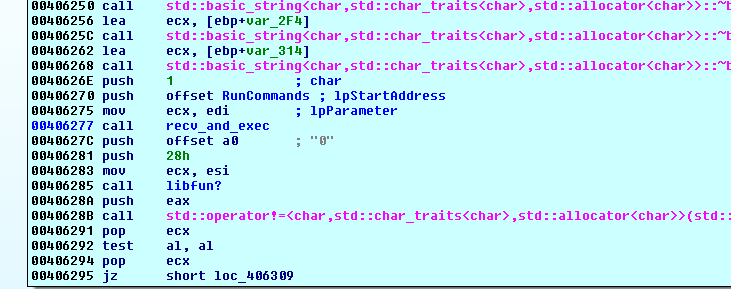
The recv_and_exec function receives commands and executes them:

The lpStartAddress is passed as an argument to recv_and_exec. Let’s investigate it; the RunCommands function at 00406371 is the core of the RAT, executing commands from the C&C server.
C&C Panel
This is the C&C panel:

The RunCommands function acts like a switch statement, with the following possible values: filemgr, downloadfromurltofile, downloadfromlocaltofile, getproclist, prockill, getwindows, closewindow, maxwindow, restorewindow, closeprocfromwindow, execcom, consolecmd, openaddress, initializescrcap, freescrcap, deletefile, close, uninstall, updatefromurl, updatefromlocal, msgbox, keyinput, mclick, OSpower, getclipboard, setclipboard, emptyclipboard, dlldata, dllurl, initfun, initremscript, initregedit, renamebck, initsocks, SetSuspendState.
Let’s investigate some of them:
- filemgr uses
FindFirstFileWandFindNextFileWto list files:

Inside filemgr, there are several other commands, such as newfolder, upload, download, etc.

C&C Communication
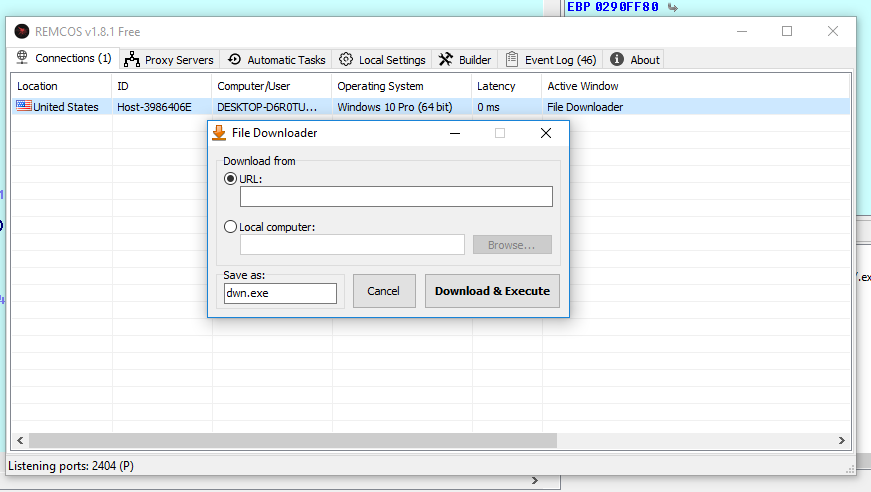
- downloadfromurltofile downloads from a URL and executes it:

The downloadfromurltofile command downloads a file from the C&C server, saves it to the %TEMP% directory, and executes it:


Process Management
- getproclist lists processes using
CreateToolhelp32Snapshot,Process32FirstW, andProcess32NextWfunctions:

- prockill determines a process using the
TerminateProcessfunction:

- Window Management: Commands like getwindows, closewindow, maxwindow, restorewindow, and closeprocfromwindow are used to manipulate windows:


- Command Execution: The execcom command executes commands:

- Console Access: The consolecmd command opens a command prompt:

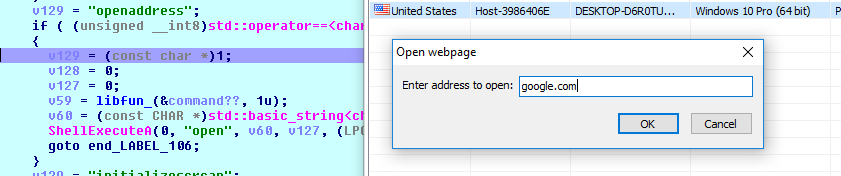
- Web Access: The openaddress command opens a web page:
- Screen Capture: The initializescrcap command uses various image functions (MSDN “MSDN”) to capture the screen. The freescrcap command is called when we close the Capture window in the C&C panel:

- File Management: The deletefile and close commands are straightforward:

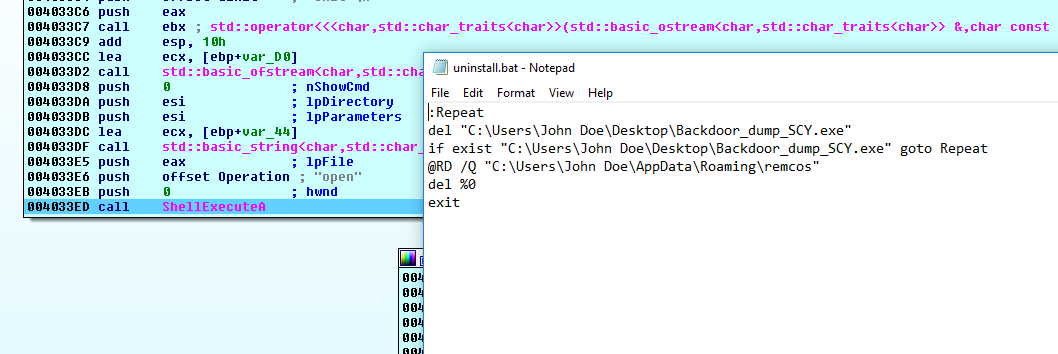
- Uninstallation: The uninstall command removes the value from the
Runkey:

It creates Uninstall.bat in the %TEMP% directory and runs it:
- Updates: The updatefromurl command downloads a file from the internet, replacing all old files and registry entries:

It then runs update.bat:
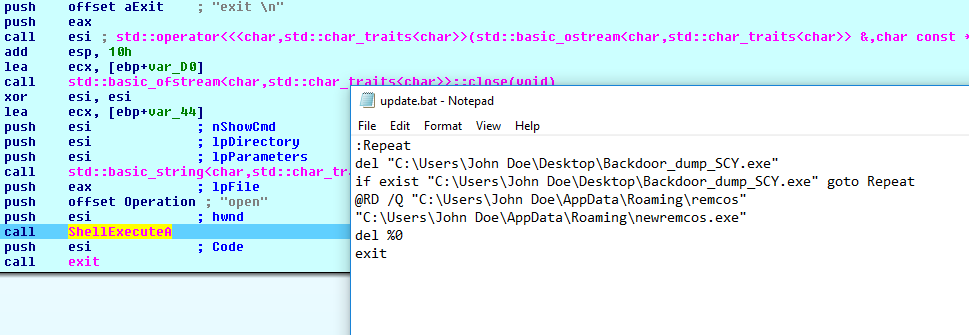
- Local Updates: The updatefromlocal command is similar to updatefromurl:

- Message Box: The msgbox command calls
MessageBoxA:

- Keylogging: The keyinput and mclick commands are likely used in keylogging, which is not available in the free edition:

- Clipboard Management: The getclipboard, setclipboard, and emptyclipboard commands perform corresponding actions:

- DLL Injection: The dlldata and dllurl commands download a DLL from the attacker’s machine and the internet:

It injects the DLL without writing it to disk using CreateFileMappingA and MapViewOfFileEx:

I suspect it uses reflective DLL injection, with LoadLibraryA and GetProcAddress used to retrieve imports for the injected DLL:

- Registry Manipulation: The initregedit command performs operations in the registry:

It uses functions from Shlwapi.dll to manipulate the registry:

- Script Execution: The initremscript command executes scripts from the C&C server:

It executes VBScript:

- ID Management: The renamebck command changes the value of the
namekey atSoftware\Remcos-MUTEXval, which is used as an ID:

- Power Management: The OSpower command is used to sleep, shut down, log off, hibernate, or restart the infected machine.
The sleep command uses SetSuspendState:

The shutdown command uses ExitWindowsEx:

- Proxy Management: The initsocks command is used to obtain a SOCKS proxy:

Data Transmission
Let’s see how it sends files and information. This is the data before the encryption routine:

This is the encryption routine:

This is the data after encryption:

We can inject into the malicious application and observe the data before it is sent using Echo Mirage:

This is the same data.
Conclusion
I may have overlooked something due to my limited knowledge. If you find anything interesting, please contact me.
That’s all for now. I’m new to reversing malware, and any feedback would be helpful for me.