Introduction
Let’s start our journey by exploring the architecture of the Android operating system and its internals. This chapter covers the essential information needed to feel comfortable with the topics discussed in the following sections.
The kernel used in Android is based on Linux but includes significant additions, such as the Low Memory Killer, wake locks, and the Binder IPC driver.
For our purposes, we are more interested in the user-mode part of the operating system. Here, Android significantly differs from a typical Linux distribution. Two important components for us are the managed runtime used by applications (ART/Dalvik) and Bionic, Android’s version of glibc, the GNU C library.
Runtime Environment on Android
When we write an Android application in Java or Kotlin, it is compiled into Dalvik bytecode, also known as Dex Code, before execution. To run the bytecode, a virtual machine is required—a runtime that intercepts the bytecode instructions and executes them on the target device. In the Java ecosystem, we have the JVM (Java Virtual Machine). On the Microsoft side, .NET uses the Common Language Runtime (CLR) virtual machine to manage the execution of .NET programs.
Dalvik bytecode - Dex Code
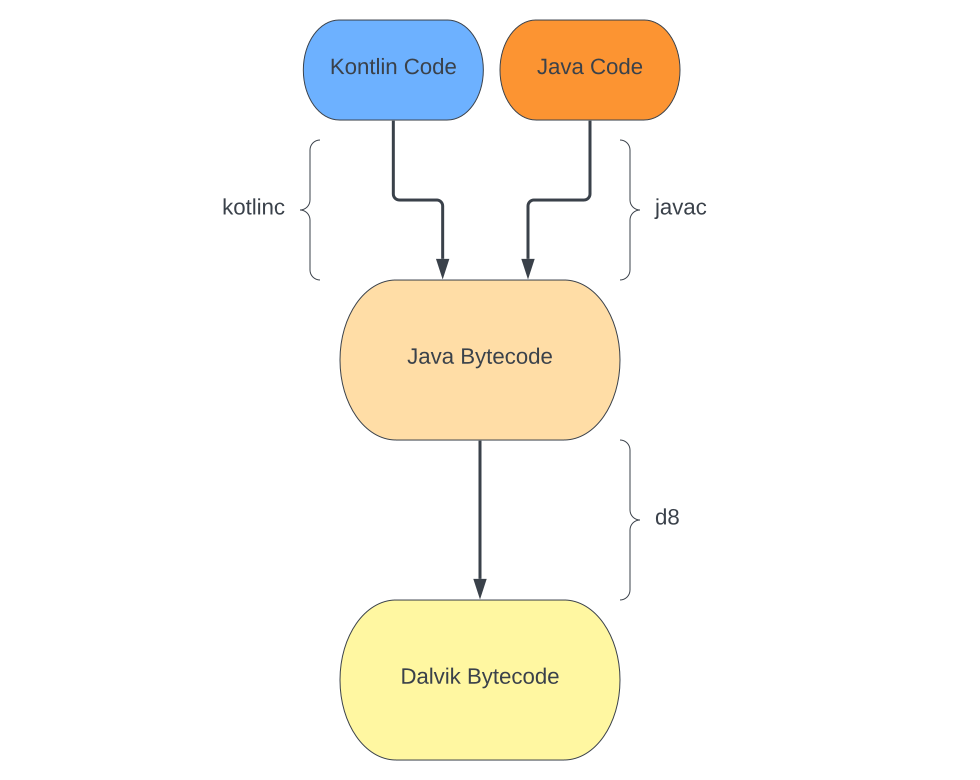
Java source code, typically written by a developer, is compiled into Java bytecode (.class file) using the javac compiler. After that, a Dex compiler, such as dx or d8, is used to convert it into Dalvik bytecode (.dex file), which is referred to as Dalvik Executable (.DEX).
The compilation process follows this flow:

We will take this small snippet of Java code and observe how it changes through these stages:
// Java file - foo.javaclass Foo { public static void main(String[] args) { example(10); } static int example(int num) { int a = 22; return a * num; }}We use javac - the Java Application Compiler - to generate the Java bytecode - .class file, and javap - the Java Class File Disassembler - to print out the bytecode:
$ javac foo.java$ javap -p Foo.class// javap output - Java bytecode{ public static void main(java.lang.String[]); descriptor: ([Ljava/lang/String;)V flags: (0x0009) ACC_PUBLIC, ACC_STATIC Code: stack=1, locals=1, args_size=1 0: bipush 10 2: invokestatic #2 // Method example:(I)I 5: pop 6: return LineNumberTable: line 3: 0 line 4: 6
static int example(int); descriptor: (I)I flags: (0x0008) ACC_STATIC Code: stack=2, locals=2, args_size=1 0: bipush 22 2: istore_1 3: iload_1 4: iload_0 5: imul 6: ireturn LineNumberTable: line 6: 0 line 7: 3}From the output, we see Java bytecode instructions such as bipush and iload_1.
Next, we need to compile the bytecode into Dalvik bytecode using d8:
$ d8 Foo.class$ dexdump -d classes.dexClass #0 - Class descriptor : 'LFoo;' ...
#1 : (in LFoo;) name : 'example' type : '(I)I' access : 0x0008 (STATIC) code - registers : 1 ins : 1 outs : 0 insns size : 4 16-bit code units000118: |[000118] Foo.example:(I)I000128: 0000 |0000: nop // spacer00012a: da00 0016 |0001: mul-int/lit8 v0, v0, #int 22 // #1600012e: 0f00 |0003: return v0
...
#2 : (in LFoo;) name : 'main' type : '([Ljava/lang/String;)V' access : 0x0009 (PUBLIC STATIC) code - registers : 1 ins : 1 outs : 1 insns size : 6 16-bit code units000148: |[000148] Foo.main:([Ljava/lang/String;)V000158: 1300 0a00 |0000: const/16 v0, #int 10 // #a00015c: 7110 0100 0000 |0002: invoke-static {v0}, LFoo;.example:(I)I // method@0001000162: 0e00 |0005: return-void...At the Dalvik bytecode (Dex Code) stage, we still have architecture-agnostic instructions, but they differ from the Java bytecode. The mul-int/lit8 single instruction is used instead of several instructions from the previous bytecode. We can say that Dalvik bytecode is an optimized version of Java bytecode.
More modern applications are written in Kotlin instead of Java. The flow is almost identical, with one minor change: the Kotlin compiler (kotlinc) converts .kt files to Java-compatible bytecode.
Dalvik VM and ART
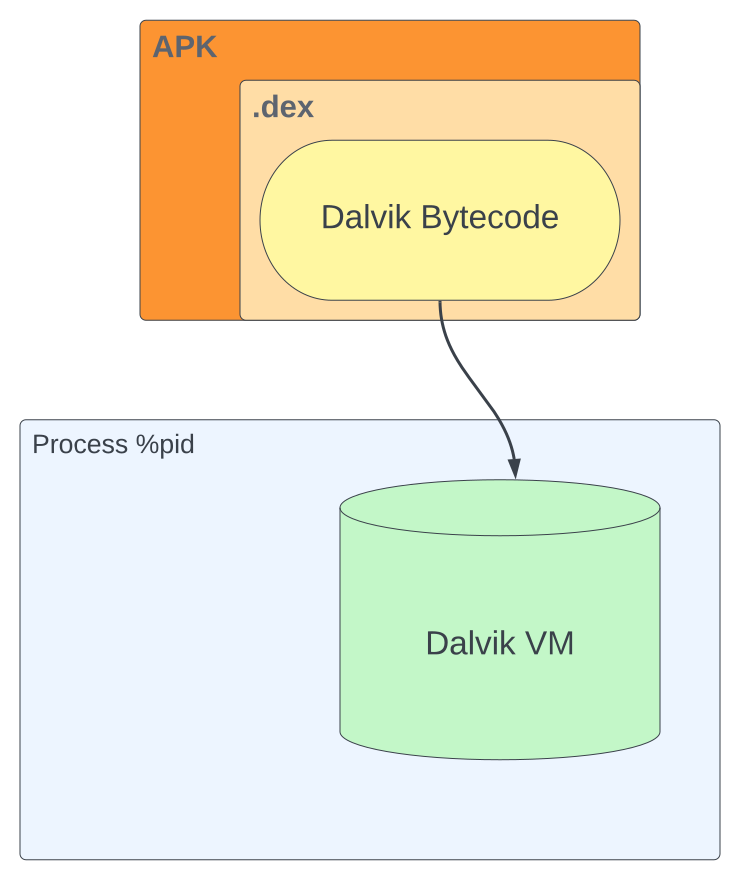
Dalvik bytecode is packed within APK and AAB files in the form of .dex files and is used by a managed runtime on Android to execute it on the device. It is now the runtime’s responsibility to handle the architecture-agnostic intermediate language file - Dex Executable File (.dex). The runtime used is Dalvik VM, which was employed by Android version 4.4 “KitKat” and earlier. Google abandoned JVM in favor of this alternative solution. The Dalvik Virtual Machine was created by Dan Bornstein with the constraints of mobile devices in mind. Each application runs in its own instance of the Dalvik Virtual Machine, making efficiency crucial for concurrently running many such processes.
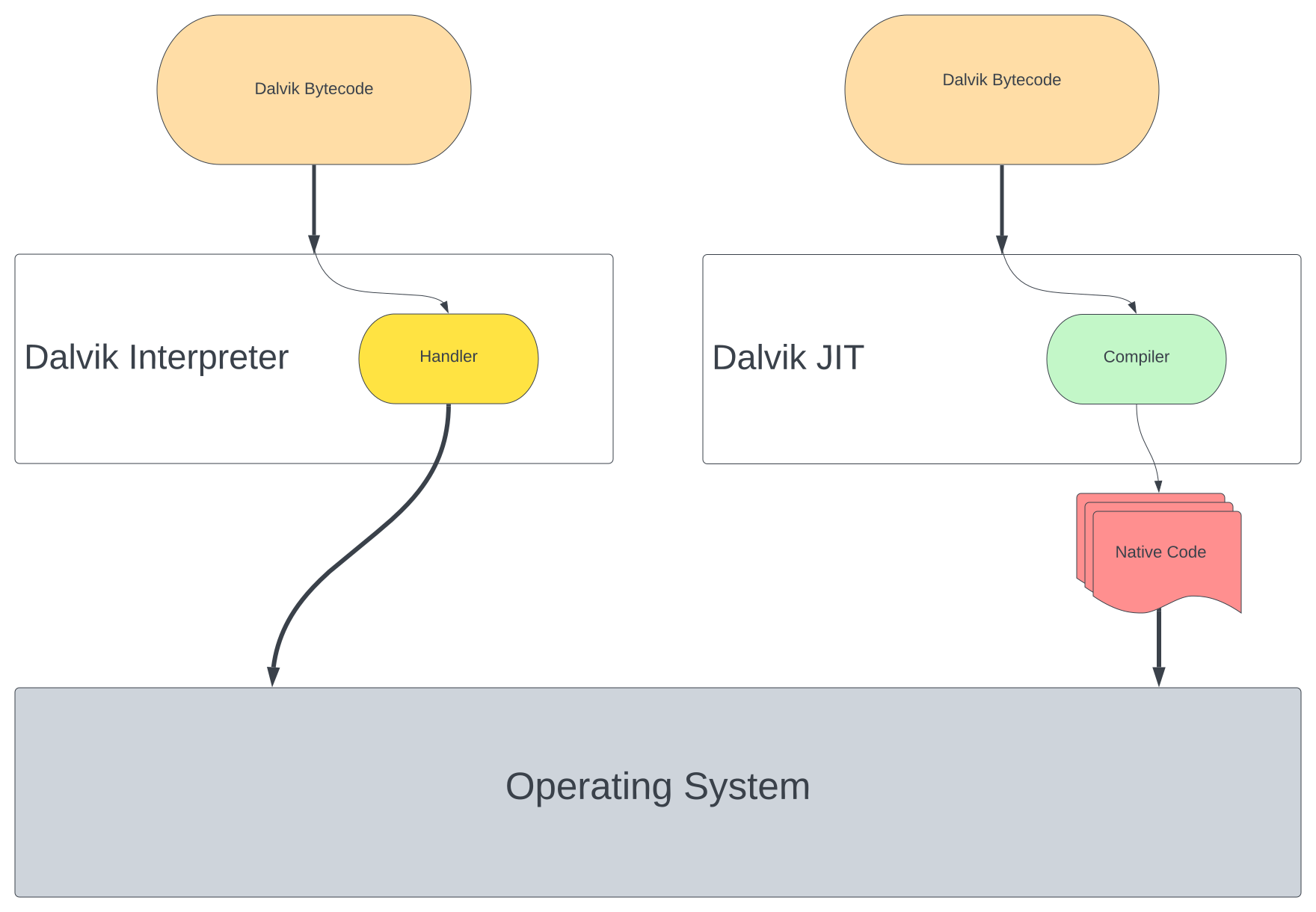
To translate the Dalvik bytecode into device-specific instructions, Dalvik VM uses two approaches: Dalvik interpreter and Dalvik JIT.
The Dalvik Interpreter can be found under the dalvik/vm/mterp directory for source code of Android versions 4.4 and earlier. It fetches each instruction and redirects them using a table to the appropriate handler.
...#define H(_op) dvmMterp_##_opDEFINE_GOTO_TABLE(gDvmMterpHandlers)...// C mterp entry point.while (true) { ... u2 inst = /*self->interpSave.*/pc[0]; ... Handler handler = (Handler) gDvmMterpHandlers[inst & 0xff]; ... (*handler)(self);}// Example of a handler#define HANDLE_OP_X_FLOAT_2ADDR(_opcode, _opname, _op) \ HANDLE_OPCODE(_opcode /*vA, vB*/) \ vdst = INST_A(inst); \ vsrc1 = INST_B(inst); \ ILOGV("|%s-float-2addr v%d,v%d", (_opname), vdst, vsrc1); \ SET_REGISTER_FLOAT(vdst, \ GET_REGISTER_FLOAT(vdst) _op GET_REGISTER_FLOAT(vsrc1)); \ FINISH(1);Dalvik JIT (Just-in-Time) is a compiler for Dalvik VM. By tracing code execution and profiling, it identifies hot execution paths and translates them into native instructions. Initially, all code is interpreted before a decision is made to compile some parts of it. After that, the compiled code runs instead of the handlers.
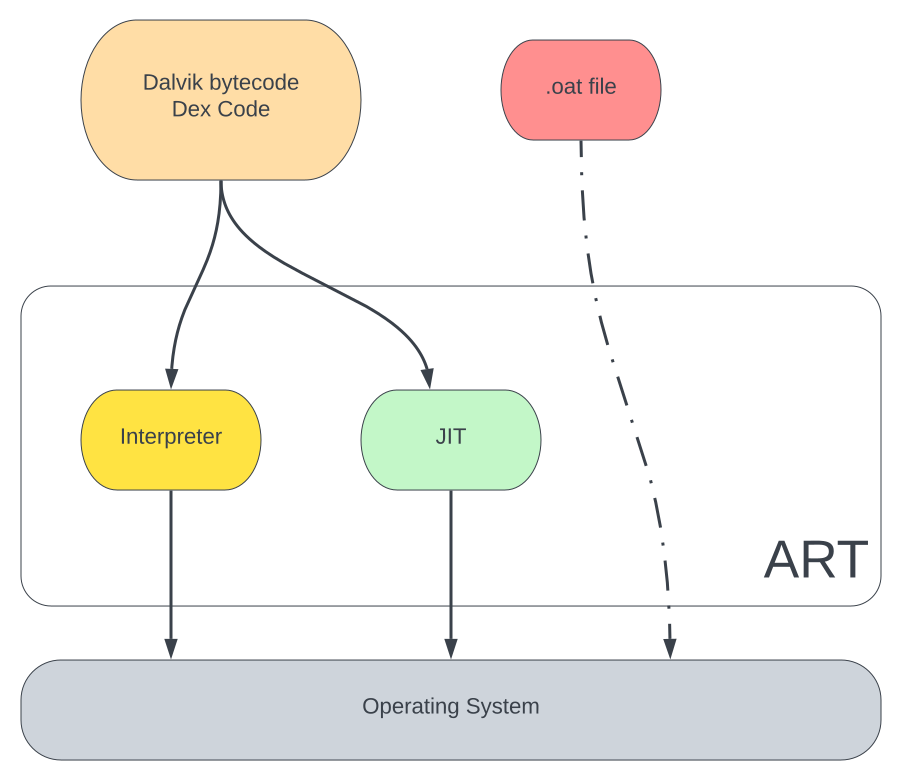
Google built a new managed runtime for Android called ART (Android Runtime), which entirely replaced Dalvik starting from Android 5.0 “Lollipop”. ART uses the same Dalvik bytecode input to maintain backward compatibility.
For our purposes, the most important feature introduced with ART is Ahead-of-Time (AOT) compilation, which pre-compiles Dalvik bytecode into native code. The generated code is saved on disk with the .oat extension. The dex2oat tool is used to perform the compilation and can be found at /system/bin/dex2oat on Android devices.
JIT occurs at runtime, while AOT happens during installation or when the device is not in use. However, this approach has a downside: it prolongs application install time and operating system update time, as it is necessary to recompile all applications.
To mitigate the downsides of AOT, recent versions of the ART runtime use a hybrid approach with profile-guided compilation. After installation, all parts of the application are interpreted, and frequently executed methods are JIT compiled. Simultaneously, profiles are generated to trace the frequently used code parts. When the device is idle, a compilation (dex2oat) daemon runs and AOT compiles code based on the generated profile from previous runs.
Some versions of Android may also receive profiles from the cloud during downloads from the Play Store to improve user experience by using them to pre-compile classes and methods.
Dalvik and ART Optimization
In Dalvik VM, we have .odex files that contain optimized, device-specific bytecode instructions to enhance interpreter performance. These files are not portable, even across different versions of Dalvik VM. The file is generated on a device by the dexopt tool and is saved under the $ANDROID_DATA/data/dalvik-cache directory.
A similar concept exists in ART, but in this case, .dex files are AOT-compiled to binary code via the dex2oat tool. The main difference is that dexopt generates optimized bytecode, while dex2oat generates ELF binary files.